
- Mac OS X – Export Google Chrome Browsing History to CSV File from the Terminal
- Mac OS X – Force Spotlight Search to Index a Network Folder
- Mac OS X – Install Yosemite/El Capitan via USB Thumb Drive or How to Get the DMG Image
- Mac OS X – Install Zabbix Agent from Source
- Mac OS X El Capitan – Cannot Restart into Boot Camp Partition
- Manually Restore a Clonezilla Image When Destination Partition is Smaller than the Original
- Mikrotik Scripting – Array Pop Function
- Mikrotik Scripting – Array Push Function
- Mikrotik Scripting – Function to Split an IP Address into an Array
- Mozilla Firefox 51.0.1 Runs Extremely Slow
- MySQL Script – Alter/Convert All Tables in a Database from MyISAM to InnoDB
- NextCloud – Purge Music Library from DB
- NextCloud – Rescan Music Library for All Users
- OpenMCU-ru – DSCP Based QoS Packet Tagging Rules for Linux IP Tables
- Outlook 2010 – Crashes Upon Opening Emails with Embedded Pictures
- Outlook 2010 – Only Starts in Safe Mode
- Outlook 2010 Hijacked
- pcapsipdump – Dump SIP Signalling and RTP Streams Per Call Leg into Separate Pcap Files
- PHP – Simple PDO Class for Connecting to a MySQL Database
- Playstation 4 – Cannot Connect to the PSN Using Comcast Gateway
- Polycom RealPresence Desktop – Do Not Minimize to Taskbar Tray
- Polycom RealPresence Desktop – Windows QoS Registry Settings
- PowerShell Script – Generate DFS-R Health Reports and Email Them
- Putty – Import/Export Your Saved Sessions List and Settings
- Raspbian – How to Run X11vnc on Startup
Classic Shell – Pin Items to the Classic Start Menu via Group Policy
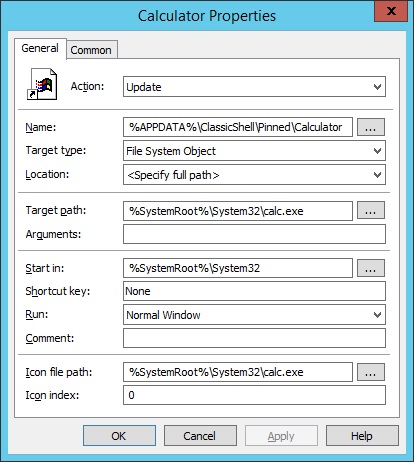
Here are a few examples of how to pin items to the Classic Shell Start Menu using Group Policy Preferences and as always navigate to here inside of Group Policy Management:
User Configuration > Preferences > Windows Settings > Shortcuts
Right-click Shortcuts > New > Shortcut
To add the Windows Calculator to the Start Menu…
Continue reading “Classic Shell – Pin Items to the Classic Start Menu via Group Policy”