
Server 2012 – Set Proxy Server and Prevent Changes via Group Policy

Thanks to Microsoft, with the removal of the Internet Explorer Maintenance section in Group Policy since IE9, once again they’ve decided to make things more complicated and the end users have lost yet another important administrative tool required for many environments.

That being said, the only way to set and enforce proxy settings in Internet Explorer now requires hacking the registry, which I’m seeing as a disturbingly all too common trend when setting up an RDS server. Here are the keys to the kingdom:

User Configuration > Preferences > Windows Settings > Registry
 Continue reading "Server 2012 – Set Proxy Server and Prevent Changes via Group Policy"
UltraVNC – Password Not Set: How to Install as a System Service

Trying to get UltraVNC (version 1.2.0.5) to run as a system service is a pain in the ass if you don’t follow a specific set of steps during the setup process. It appears that if you check the box to install it as a service during the initial installation wizard, you will encounter the annoying “Password Not Set” error and nothing works. I also had issues with running the MSI installer rather than the EXE, so stick with the executable if you’re in a rush. I don’t have time at the moment to write up a giant all-encompassing post with accompanying pictures and what have you so here’s what you gotta’ to do:
Continue reading “UltraVNC – Password Not Set: How to Install as a System Service”

Server 2012/Windows 8 – CLSID Key (GUID) Shortcuts List

I found this information to be invaluable when having to hack my way through the registry to lock down a 2012 RDS Server so I wanted to make a post here for future reference. Every bit of the credit goes to this site as I’m simply just copying the info.

You could use either command below to create a shortcut with the CLSID key (GUID) for what it opens. If the shortcut doesn’t work with one command, then use the other one.

You would right click or press and hold on the desktop, click/tap on New and Shortcut, use a command below for the “location”, then type in a name for the shortcut. If you like, you can Pin to Taskbar on desktop, Pin to Start screen, add to Quick Launch, assign a keyboard shortcut to it, or move this shortcut to where you like for easy use. Continue reading “Server 2012/Windows 8 – CLSID Key (GUID) Shortcuts List”

Classic Shell – Pin Items to the Classic Start Menu via Group Policy

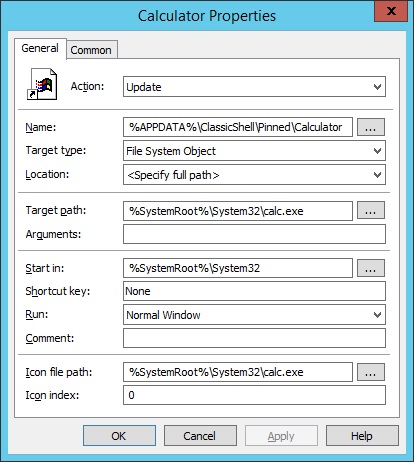
Here are a few examples of how to pin items to the Classic Shell Start Menu using Group Policy Preferences and as always navigate to here inside of Group Policy Management:

User Configuration > Preferences > Windows Settings > Shortcuts
Right-click Shortcuts > New > Shortcut

To add the Windows Calculator to the Start Menu…

Pin2StartCalcGPP
Continue reading “Classic Shell – Pin Items to the Classic Start Menu via Group Policy”

Server 2012 – Creating Always Maximized Internet Explorer Desktop Shortcuts to Websites via Group Policy

One annoying thing that happens a lot in Windows is the odd window size in Internet Explorer when clicking on any URL type shortcut icon. Unfortunately, with the URL type shortcuts, there’s not really a way to guarantee how the window size will be positioned every time as most of the time it goes by your previous IE window’s state but we all know there are scenarios where that isn’t always the case.
Continue reading “Server 2012 – Creating Always Maximized Internet Explorer Desktop Shortcuts to Websites via Group Policy”

Server 2012 – Set Internet Explorer Home/Start Page via Group Policy

If you want to set the user’s home page initially but then allow them to change it to whatever they want, on the Common tab in Group Policy Preferences, just make sure to check the box “Apply once and do not reapply” otherwise, any changes the user makes to their home page will be lost the next time they log in.
Continue reading “Server 2012 – Set Internet Explorer Home/Start Page via Group Policy”

Server 2012 – Add a 32 Bit Internet Explorer Shortcut Icon on the Desktop via Group Policy

On an 2012 RDS Server, when running a software restriction policy, your 64 bit browser won’t work unless you specifically create a rule to allow it. In addition to that, on an RDS Server, there’s not really any advantage to using the 64 bit version of IE because almost all plugins were only built with 32 bit support.

That being said, at first I had some trouble creating a desktop icon for the 32 bit version of IE using Group Policy Prefences. Strangely enough, if I set the path in my shortcut to %PROGRAMFILES(x86)% it still brought up the 64 bit version of IE somehow, WTF?! Basically to figure this out, I just copied the shortcut properties of the IE icon on the Classic Shell Start Menu.
Continue reading “Server 2012 – Add a 32 Bit Internet Explorer Shortcut Icon on the Desktop via Group Policy”

Foxit Reader 7.0 – Set as the Default PDF Viewer via Group Policy

When locking down your RDS Server, here are the registry keys needed to set Foxit Reader as the default PDF viewer per user via Group Policy Preferences to disable the annoying first run pop-up (technically, you can use just the last registry entry only and it will work but adding all of the keys is probably the safer approach):
Continue reading “Foxit Reader 7.0 – Set as the Default PDF Viewer via Group Policy”